Process Injection
Tactics: Defense Evasion, Privilege Escalation Technique: Process Injection
Process injection is one of the most common techniques used to dynamically bypass antivirus engines. Many antivirus vendors and software developers rely on so-called process injection or code injection to inspect processes running on the system. Using process injection, attacker can inject malicious code into the address space of a legitimate process within the operating system, thereby avoiding detection by dynamic antivirus engines.
Base knowledge
Before we understand what process injection is, we need to know about the concept of the process address space, process-injection steps and Windows API.
Process Address Space
A process address space is a space that is allocated to each process in the operating system based on the amount of memory the computer has. Each process that is allocated memory space will be given a set of memory address spaces. Each memory address space has a different purpose, depending on the programmer’s code, on the executable format used (such as the PE format), and on the operating system, which actually takes care of loading the process and its attributes, mapping allocated virtual addresses to physical addresses, and more. The following diagram shows a sample layout of a typical process address space: 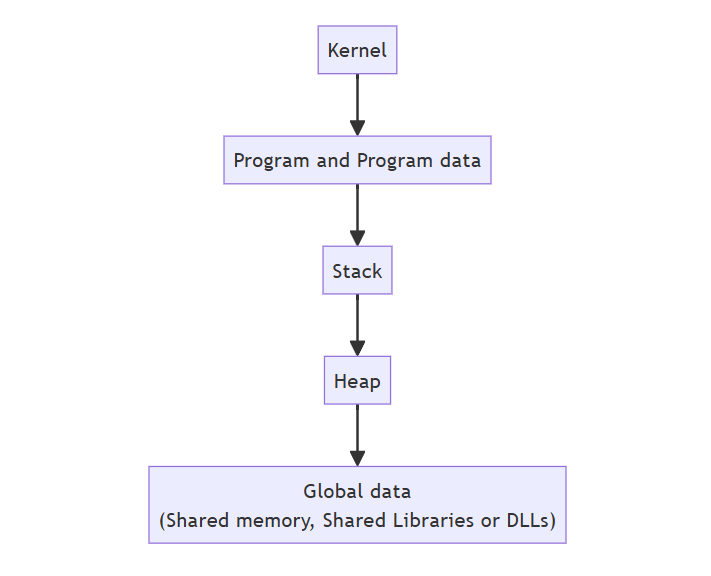
Process-injection steps
The goal of process injection is to inject a piece of code into the process memory address space of another process, give this memory address space execution permissions, and then execute the injected code. This applies not merely to injecting a piece of shellcode but also to injecting a DLL, or even a full executable (EXE) file. To achieve this goal, the following general steps are required:
- Identify a target process in which to inject the code.
- Receive a handle for the targeted process to access its process address space.
- Allocate a virtual memory address space where the code will be injected and executed, and assign an execution flag if needed.
- Perform code injection into the allocated memory address space of the targeted process.
- Finally, execute the injected code.
The following diagram depicts this entire process in a simplified form: 
Now that we have this high-level perspective into how process injection or code injection is performed, let’s turn to an explanation of Windows API functions.
Windows API
The Windows API is Microsoft’s core set of APIs, allowing developers to create code that interacts with underlying, prewritten functionality provided by the Windows operating system. Windows API functions are user-mode functions that are fully documented on Microsoft’s site at msdn.microsoft.com. However, most Windows API functions actually invoke Native APIs to do the work. For instance, when a Windows API function such as CreateFile() is called, depending on the parameter provided by the developer, Windows will then transfer execution to one of two Native API routines: ZwCreateFile or NtCreateFile.
Sub-technique of Process Injection
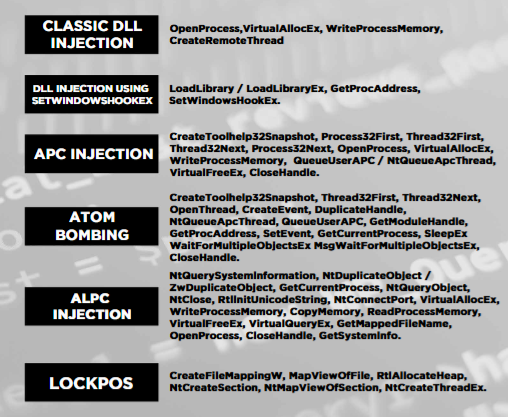
There are many sub techniques of process injection, but we’ll explore some of these in this blog.
Classic DLL Injection
This technique forces the loading of a malicious DLL into a remote process by using these six basic Windows API functions:
- OpenProcess: Using this function and providing the target process ID as one of its parameters, the injector process receives a handle to the remote process.
- VirtualAllocEx: Using this function, the injector process allocates a memory buffer that will eventually contain a path of the loaded DLL within the target process.
- WriteProcessMemory: This function performs the actual injection, inserting the malicious payload into the target process.
- CreateRemoteThread: This function creates a thread within the remote process, and finally executes the LoadLibrary() function that will load our DLL.
- LoadLibrary/GetProcAddress: These functions return an address of the DLL loaded into the process. Considering that kernel32.dll is mapped to the same address for all Windows processes, these functions can be used to obtain the address of the API to be loaded in the remote process.
After performing these six functions, the malicious DLL file runs within the operating system inside the address space of the target victim process. Example in IDA Pro: 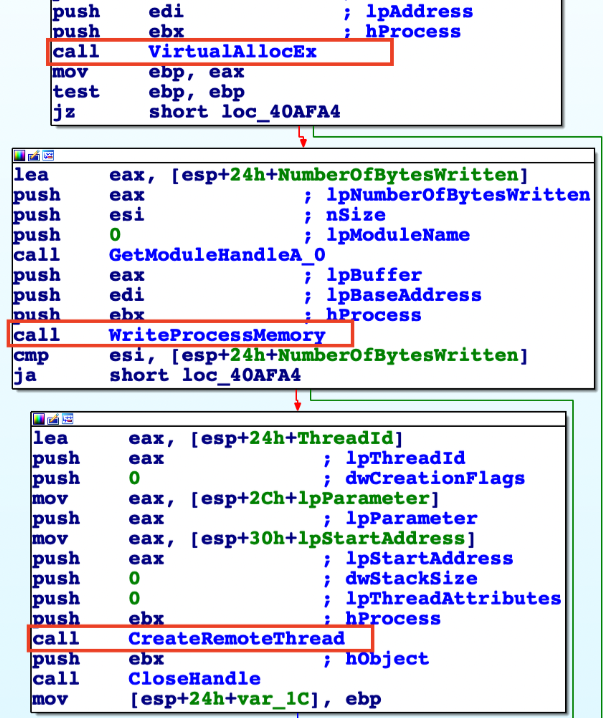
Process Hollowing
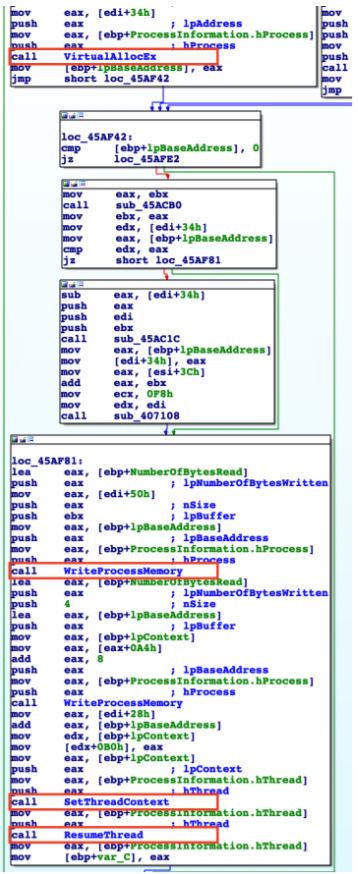
This injection technique lets us create a legitimate process within the operating system in a SUSPENDED state, hollow out the memory content of the legitimate process, and replace it with malicious content followed by the matched base address of the hollowed section. Here are the API function calls used to perform the process-hollowing injection technique:
- CreateProcess: This function creates a legitimate operating system process (such as notepad.exe) in a suspended state with a
dwCreationFlagsparameter. - ZwUnmapViewOfSection/NtUnmapViewOfSection: Those Native API functions perform an unmap for he entire memory space of a specific section of a process. At this stage, the legitimate system process has a hollowed section, allowing the malicious process to write its malicious content into this hollowed section.
- VirtualAllocEx: Before writing malicious content, this function allows us to allocate new memory space.
- WriteProcessMemory: As we saw before with classic DLL injection, this function actually writes the malicious content into the process memory.
- SetThreadContext and ResumeThread: These functions return the context to the thread and return the process to its running state, meaning the process will start to execute.
An example about malware using process hollowing in IDA Pro: 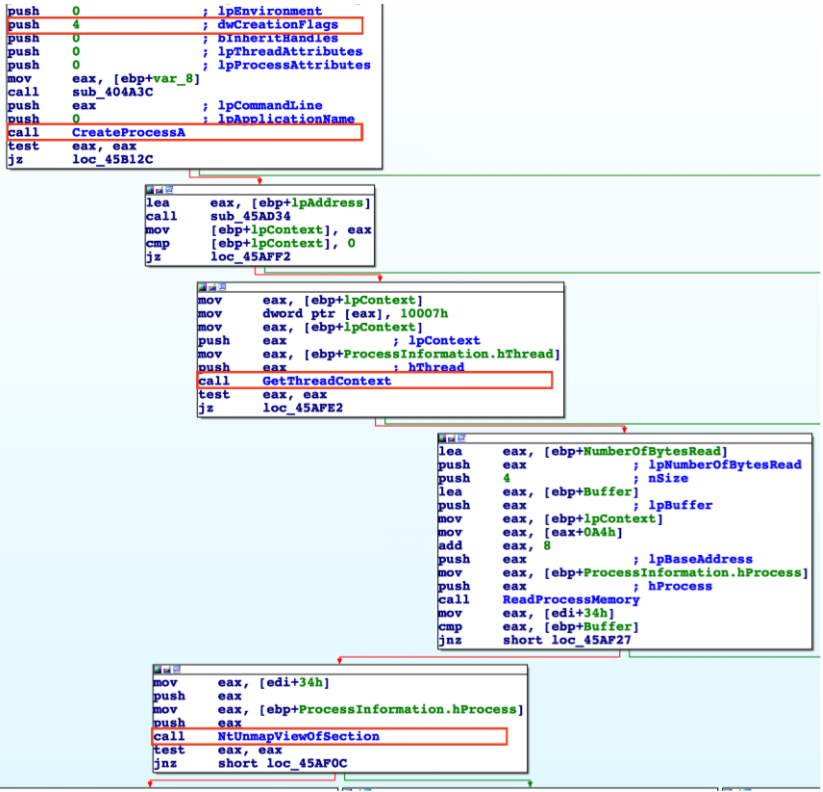
Process Doppelgänging
This fascinating process-injection technique is mostly used to bypass antivirus engines and can be used to evade some memory forensics tools and techniques. Process doppelgänging makes use of the following Windows API and Native API functions:
- CreateFileTransacted: This function creates or opens a file, file stream, or directory based on Microsoft’s NTFS-TxF feature. This is used to open a legitimate process such as notepad.exe.
- WriteFile: This function writes data to the destined injected file.
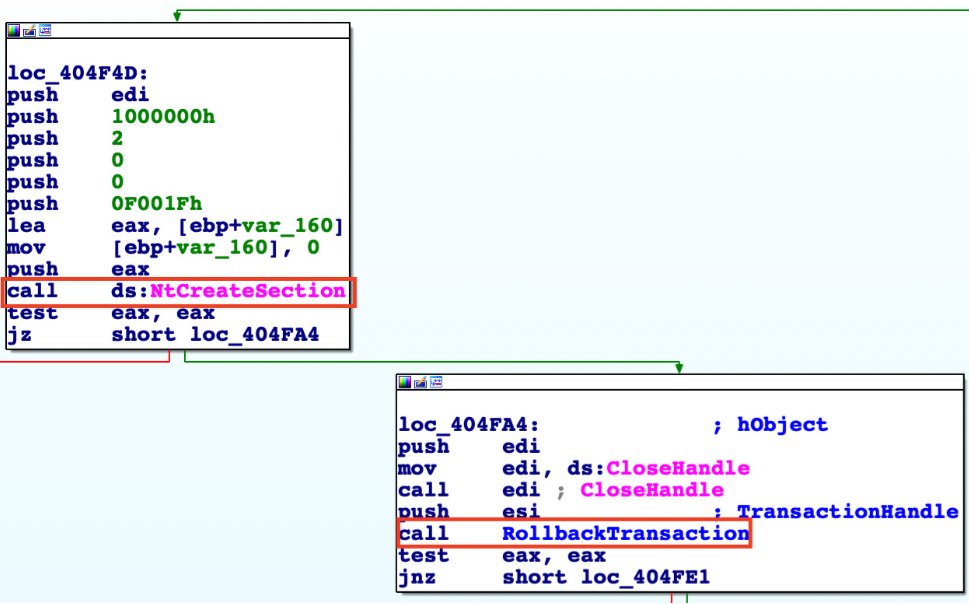
- NtCreateSection: This function creates a new section and loads the malicious file into the newly created target process.
- RollbackTransaction: This function ultimately prevents the altered executable (such as notepad.exe) from being saved on the disk.
- NtCreateProcessEx, RtlCreateProcessParametersEx, VirtualAllocEx, WriteProcessMemory, NtCreateThreadEx, NtResumeThread: All of these functions are used to initiate and run the altered process so that it can perform its intended malicious activity.
An example about PE file using process doppelgänging: 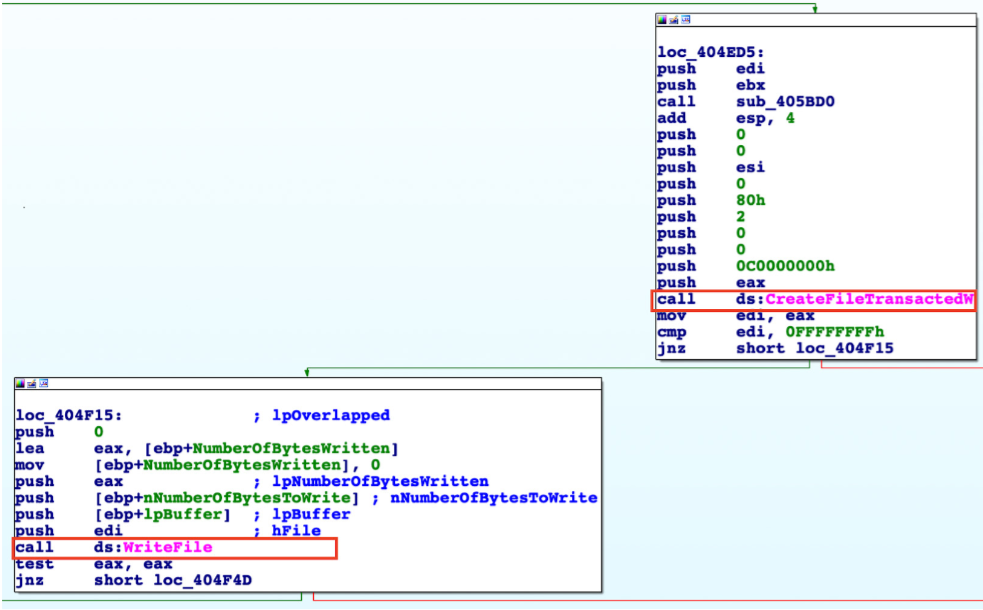
Process Herpaderping
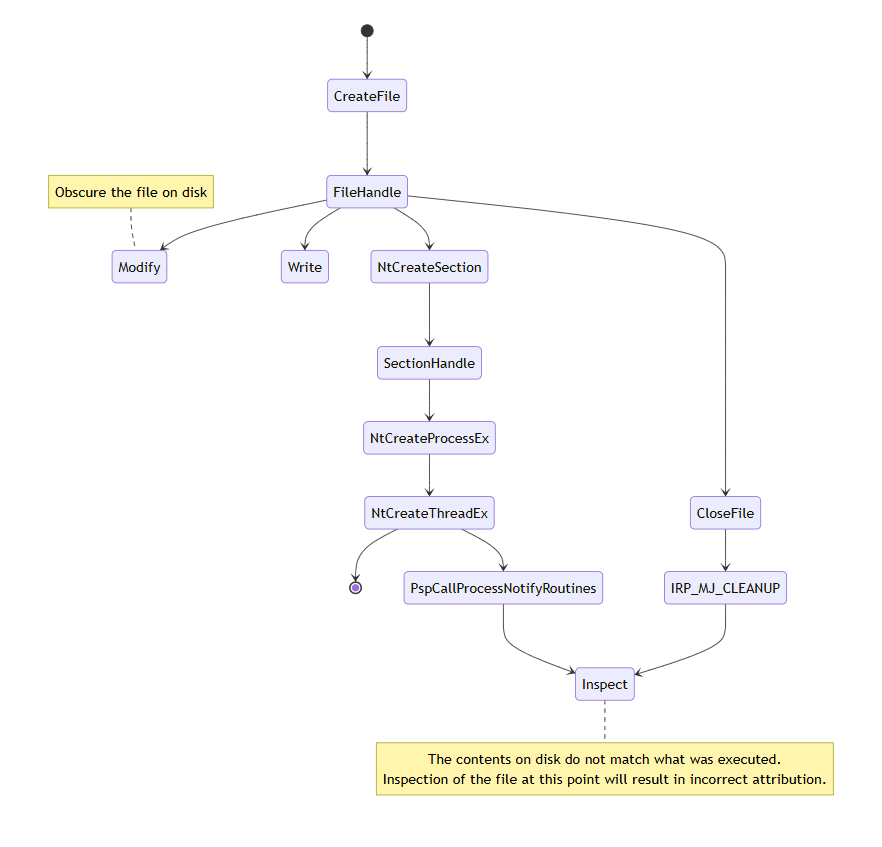
The Process Herpaderping technique bypasses security products by obscuring the intentions of the process, making it difficult for security tools to detect and prevent the malicious activity. It use the following functions:
- CreateProcess: Creates a new process in a suspended state.
- NtCreateSection: Creates a section object to share memory between processes.
- NtMapViewOfSection: Maps a view of the section into the address space of the target process.
- WriteProcessMemory: Writes the executable code into the mapped section of the target process.
- SetThreadContext: Sets the context of the main thread of the target process to point to the entry point of the malicious code.
- ResumeThread: Resumes the main thread of the target process, causing it to execute the malicious code.
Comparison
Process Hollowing Process Hollowing involves modifying the mapped section before execution begins, which abstractly this looks like: map -> modify section -> execute. This workflow results in the intended execution flow of the Hollowed process diverging into unintended code. Doppelganging might be considered a form of Hollowing. However, Hollowing is closer to injection in that Hollowing usually involves an explicit write to the already mapped code. This differs from Herpaderping where there are no modified sections.
Process Doppelganging Process Doppelganging is closer to Herpaderping. Doppelganging abuses transacted file operations and generally involves these steps: transact -> write -> map -> rollback -> execute. In this workflow, the OS will create the image section and account for transactions, so the cached image section ends up being what you wrote to the transaction. The OS has patched this technique. Well, they patched the crash it caused. Maybe they consider this a “legal” use of a transaction. Thankfully, Windows Defender does catch the Doppelganging technique. Doppelganging differs from Herpaderping in that Herpaderping does not rely on transacted file operations. And Defender doesn’t catch Herpaderping.
Process Herpaderping The registered kernel callback is invoked when the initial thread is inserted, not when the process object is created. Because of this, an actor can create and map a process, modify the content of the file, then create the initial thread. A product that does inspection at the creation callback would see the modified content. Additionally, some products use an on-write scanning approach which consists of monitoring for file writes. An actor using a write -> map -> modify -> execute -> close workflow will subvert on-write scanning that solely relies on inspection at IRP_MJ_CLEANUP.
| Type | Technique |
|---|---|
| Hollowing | map -> modify section -> execute |
| Doppelganging | transact -> write -> map -> rollback -> execute |
| Herpaderping | write -> map -> modify -> execute -> close |
Other techniques
You can explore more techniques from: https://www.exploit-db.com/docs/47983